

Firefox users..need help...Opens new window instead of new tab....

By coffeebreak
@coffeebreak (17797)
United States

March 18, 2012 3:48pm CST
I use Firefox. Have the current version. Suddenly, and I mean that literally as I have done nothing or changed anything...when I click a link in an email (Yahoo email) where it used to open that link in a new TAB, now it opens that link in a new WINDOW.
I am a novice and don't know tons about the programs and things like that so I have just the basics and they are fine for me. So...why did it change from opening the link in a new tab to opening it in a new window? I want it to open in a tab, that on the toolbar...is right next to the tab I am using. Any suggestions? I hae searched the Tools/Options features and find nothing about choosing which way to open a new link. THanks for your help
3 responses

@owlwings (43897)
• Cambridge, England
18 Mar 12
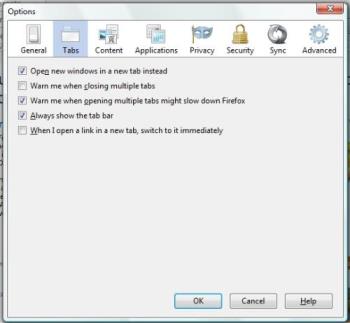
You should find this in Tools/Options - Tabs.
These are my settings and I always get a new tab rather than a new window.
@owlwings (43897)
• Cambridge, England
18 Mar 12
Firefox has just updated to version 11. I haven't noticed anything different or strange yet but I wonder if that may be something to do with it in your case. Otherwise, I don't have any explanation.
@coffeebreak (17797)
• United States
18 Mar 12
Thanks Owlwings...that is what I have checked. I haven't updated to 11 yet..just yesterday got the notice and haven't bothered with it yet until I fix this problem! THe strangest things always happen to me!

@kundanraj (660)
• India
19 Mar 12
Tab browsing is what the feature every browser implementing and for they had made automatic setting. I think you changed setting and that making links opening in windows rather than in tabs.
As owlwing said just go to options by selecting firefox button at top left and choose options-options. A popup will appear. In the 'tabs' check the first option which say 'open new window in a new tab instead' or press alt+t. Save the setting.
All these matter you can get help from mozilla help center. Just post question there or browser already exist ans.

