

How to change the Enjin Chatbox

By Twisted Fury
@TwistedFury (3)
Raleigh, North Carolina

September 23, 2013 8:56pm CST
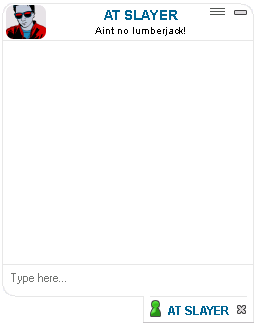
You may not be able to see it, but the chat-container has a top-left, top-right and bottom-left border-radius. This will stand out more once the code is on your site.
The code is really simple, and marked below in the spoiler. Simply place it into any HTML Module and place it on any page for the effect to occur.
Here is the HTML
.chat-container-user {border-bottom-left-radius: 10px; border-top-right-radius: 10px; border-top-left-radius: 10px;}
.chat-container-user .title .info .username {text-align:center; width:87.5%;}
.chat-container-user .title .info .topic {text-align:center; width:87.5%;}
.chat-container-user .title .resize-anchor, .chat-container-channel .header .resize-anchor {left:85%;}
.chat-container-user .title .info .minimize {top:-5px;}
.chat-container-user .title .avatar {border-right:none;}
.chat-container-user .title .avatar img{border-radius:25px;}
.chat-container-user .contents .input-area .icon-chat {display:none;}
Have fun!
No responses
