

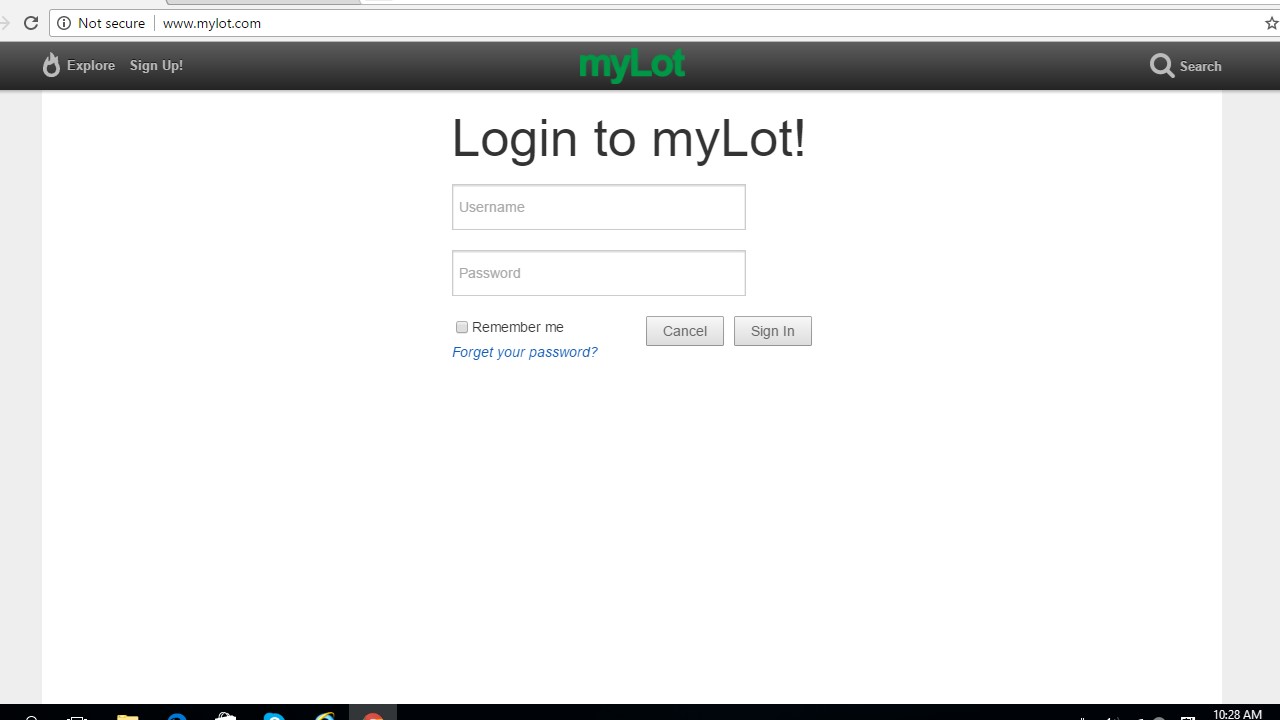
Something is wrong with my Google Chrome. I need help please.

By Curlann
@annierose (21977)
United States

February 7, 2017 8:34pm CST
It started last night that I noticed the message "not secure" always showing up in my Google Chrome. I already cleared my cache and all the cookies but I still get that message. Then, I decided to uninstall and reinstall Google Chrome but to no avail.
Have you experienced the same thing before? I hope someone can help me solve this issue.
7 people like this
8 responses

@owlwings (43897)
• Cambridge, England
8 Feb 17
The commonest reason for this is that your system clock is set to the wrong date or time. If your computer is more than four or five years old, the backup battery (a small button cell on the motherboard) may have run down and need replacing.
3 people like this
@annierose (21977)
• United States
8 Feb 17
@owlwings I checked it and both are okay. I think I will just use other browser for Mylot.
1 person likes this
@owlwings (43897)
• Cambridge, England
8 Feb 17
@annierose Having done some research, I find that the message is very likely connected with the new version of Chrome which, apparently, marks ANY page which requires password and/or credit card information and does not have 'https...' at the beginning as being 'not secure'. In the case of myLot and many other sites where you are simply logging in, you don't need to worry about it and can ignore it but any site which uses sensitive information (such as payment details) should be using the Secure Sockets Layer technology and should have a URL beginning with 'https'.
3 people like this
@annierose (21977)
• United States
8 Feb 17
@owlwings I do not experience it in Facebook. So perhaps Facebook uses https?
1 person likes this


@annierose (21977)
• United States
9 Feb 17
@LadyDuck Thank you Anna! I am just afraid that someone might get my sensitive information.
1 person likes this
@annierose (21977)
• United States
9 Feb 17
@LadyDuck I see. Thanks for that information Anna. 
1 person likes this
@LadyDuck (502190)
• Italy
9 Feb 17
@annierose You know, when you are online we cannot be 100% sure, but a good firewall and an antivirus usually are capable to block most of the treats.
1 person likes this

@annierose (21977)
• United States
8 Feb 17
@sishy7 It is not yet resolved. The only option I have is to use other browser.
1 person likes this

@PurnaSharma (2562)
• Guwahati, India
8 Feb 17
It might be happen bcoz of not secure connection.
1 person likes this
@annierose (21977)
• United States
8 Feb 17
@PurnaSharma Yes, but it just happened last night.
1 person likes this
@PurnaSharma (2562)
• Guwahati, India
8 Feb 17
@annierose ..now that resolved??
And how you are doing
1 person likes this

@bluesa (15022)
• Johannesburg, South Africa
8 Feb 17
It is very worrying when warning messages start flashing! I hope you have been able to figure out and fix whatever was causing it @annierose .
1 person likes this
@annierose (21977)
• United States
8 Feb 17
@bluesa Thank you for the concern. That message only appears in Chrome and not in other browsers. I was not able to resolve that issue.
1 person likes this
@bluesa (15022)
• Johannesburg, South Africa
8 Feb 17
@annierose , sorry to hear that. It is a pain when something can not be resolved.
1 person likes this

 I only use chrome on android
@annierose (21977)
• United States
8 Feb 17
@AkoPinay When I log in to my blog, it shows not secure too. But, when I use other browsers, no message like that.
1 person likes this
@AkoPinay (11496)
• Philippines
8 Feb 17
@annierose don't panic I guess it's only on your chrome settings. Your blog is HTTP too try
try
From Wikipedia, the free encyclopedia Jump to: navigation, search "Blogger" redirects here. For the Google service with same name, see Blogger (service). For other uses, see Blog (disambiguation). Not to be confused with .blog. Journalism Areas Genres Soci
1 person likes this
@annierose (21977)
• United States
8 Feb 17
@AkoPinay Is there a way to make my blog in https?
1 person likes this

@louievill (28846)
• Philippines
8 Feb 17
What operating system ( OS) are you using? If you are still using windows xp it no longer supported by microsoft so it does not get security updates.
1 person likes this
@annierose (21977)
• United States
8 Feb 17
@louievill Hi Louie! I am using Windows 10. Other browsers are okay.
2 people like this

@DesirousDreamer (34776)
• Peoria, Arizona
8 Feb 17
That is so odd, I have never had this problem. Do you have anything on your computer that can help wipe out junk files and such? I don't know if that would help. At least it is not a big red exclamation mark.
1 person likes this
@annierose (21977)
• United States
8 Feb 17
@DesirousDreamer I just experienced it last night. I tried to log in using other browsers and I do not see that message.
1 person likes this
