

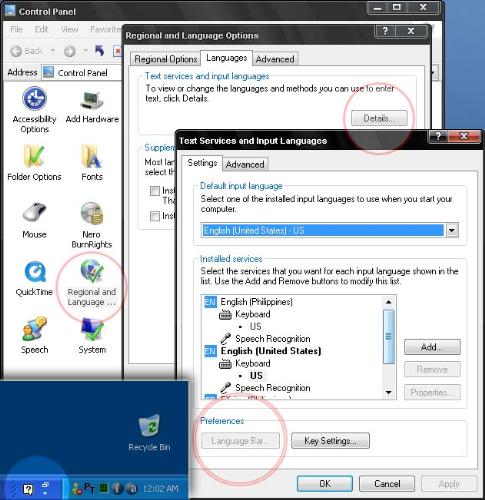
Howto enable "Language Bar" back ON again?

By ferdzNK
@ferdzNK (3211)
Philippines

April 28, 2008 6:27pm CST
The Language Bar is ON by default in my WinXP when I installed it, since I have no use of it then, I turned it OFF and hide its visibility. Now, I need it to be ON again but I can't the LB button is grayed out. I have captured my screen for visual reference.
Can you guys help me out with this one?
Thanks in advance.
1 person likes this
1 response

 This is something I've never encountered....still trying to figure out
@ferdzNK (3211)
• Philippines
29 Apr 08
He he he, Thanks anyway there mate. I know its just here because I turn it off in the first place. It eludes me since last night. In any case just post here if you find it.
Why em I looking for it? I have responded to a discussion yesterday about speech-to-text feature of MS Word and that the only part left for me to implement it. It sort of a switch to start and stop Word's dictation. Imagine I talk it types, my problem with spelling will be over .
.
.