

Safe Browsing For All

By Anh Phan
@anh101 (1379)

January 16, 2016 11:19pm CST
In the early days of using internet I did browse all of the www searching for stuff online, sometimes, read and ignore, sometimes read and bookmark.
Nowadays scamming, spamming is becoming popular. To help google browser AKA - Chrome users to be safe in browsing. Here are something you should do:
1. Log out your user account on chrome (everyone to use Gmail will be set default for browser also) There are a lot of tracking site can track your pace. So consider to go incognito or log out the user if you do like privacy.
2. Install WOT (One Chrome extension to help you analyze scamming sites, and suggestions for safety browsing). Links to the site
3. Install AdBlockPlus To stop the pop up ads and some other type of ads or media tools to bother you (AdBlockPlus extension can be found at Chrome extension store)
P/s You can set up for each site on Adblockplus in case of some bad website ads bombing you
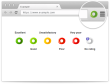
WOT is a free website reputation, rating and review tool that helps find trustworthy websites and protects against online scams, untrustworthy links, and unreliable web stores. Free add-on for Firefox, IE, Chrome, Opera and Safari browsers.
2 people like this
No responses
