

Splitting Up is Great Fun
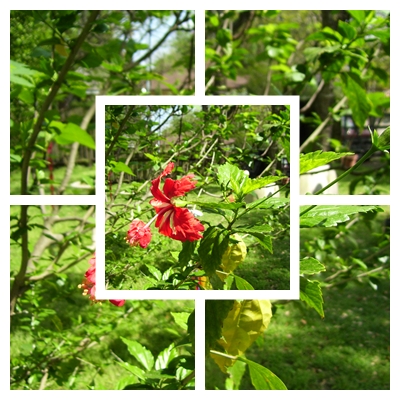

By Gus Kilthau
@Ceerios (4698)
Goodfellow, Texas

October 9, 2016 4:11pm CST
Splitting Up is Great Fun -
Yes it is great fun, this splitting up stuff, especially if you are in the divorce lawyer business or if you want to make a large-size photo from a smaller size image.
Not an easy thing to do if you are trying to print an entire wall poster all at once using your small computer printer.
You can do the job easily using a computer program that does the image splitting for you. I used the program, "PhotoScape" to split the image of a hibiscus flower into four pieces for printout using my little Canon color printer. With the use of some double-sided sticky tape and a pair of four-power reading glasses (I can't see closeup stuff too well...) I pasted those four printouts together to make one whole flower picture like the center image of the whole thing, shown above.
A couple of clicks on your keyboard after you select the original picture for splitting - and you are all done and ready for printing. Nothing to it - except the nice big wall-size picture you just produced.
There is another splitter program that I have often used to do little chores like this one, "PosteRazor." It has some features missing in the Photoscape program, but the results are reasonably equivalent between the two pieces of software.
I downloaded both programs for free through "SourceForge.net."
* * * * * * * * * *
Image source: Gus Kilthau
* * * * * * * * * *
2 people like this
4 responses


@pgntwo (22405)
• Derry, Northern Ireland
10 Oct 16
@Ceerios Sounds like something fun, if this sample from the Uxbridge English Dictionary appeals to your funny bone...:

[caption id="attachment_59976" align="aligncenter" width="460" caption=""Barbecue - a long line of plastic dolls""][/caption] As it's President's Day, we're not going to try and cram any...
1 person likes this
@Ceerios (4698)
• Goodfellow, Texas
11 Oct 16
@pgntwo - Friend PGN - Funny stuff, that. Makes me almost wish that I had abandoned all of the lucrative and useful careers in the military, medical, and techie worlds so as to be eternally amused and made wealthy in literary endeavors. The problem with that would have been the necessity to actually learn a thing or two.-Gus-
1 person likes this


@MarshaMusselman (38865)
• Midland, Michigan
27 Oct 16
I have downloaded photoscape and use it for basic editing of my images. I'm trying to find something you wrote in the past, but I don't remember whether it was here or bubblews. It was on how to do kaleidescopes with our images. If you did something here, can you send me the link or remind me when and the name of the post?
1 person likes this
@Ceerios (4698)
• Goodfellow, Texas
27 Oct 16
@MarshaMusselman - Ms Marsha - A good way for you to learn kaleidoscope production is to actually put some together. The reason for that is the variables are so many that you may sit there playing with them for a while until you settle on the one or on the ones you like best. You can change the X and Y centers, the angulations, and so forth as you like, all the while looking at your creations. I have also found it to be a good idea to edit the hues and contrasts of the images prior to putting kaleidoscopic views together. Do it and you will see how it works. The kaleidoscopic app that I like best is to be found in the program, "GimPhoto." It is a freebie download from SourceForge.net. There are many additional photo manipulation apps on that same program. For example, I made the winking cat's eye using that program just today on the "Happy Cat" posting - and also the photo sharpness was enhanced a good amount.
In GimPhoto, the photo manipulation apps are largely located in the "Filters" menu tab and with "Kaleidoscope" being in its "Distorts" menu dropdown.
By the way - I looked for you on Niume. Found your name and your 3 "spheres" but no content.???
 - Gus -.
- Gus -.1 person likes this
@Ceerios (4698)
• Goodfellow, Texas
28 Oct 16
@MarshaMusselman - Ms Marsha - I apologize for the geeky tech stuff. X and Y relate to the side by side and the up and down centering of your kali image to be. The editing of hue of an image makes it more or less colorful as does contrast control (in a way). Making your kaleidoscope using a controllable program is a lot more fun and a lot better than using a cut and dried program that does the whole business for you - often resulting in a so-so kali image.
Now I understand why I could not find "your stuff" on niume. You did not put anything there other than choosing three different image buckets (spheres) in which to put them. (Same thing here. I looked, I saw, and I left.
Regards, -Gus-
1 person likes this
@MarshaMusselman (38865)
• Midland, Michigan
28 Oct 16
@Ceerios Although working with contrast and hues might be fun for you for me it could turn out to be a task I don't complete. I'd rather find a program I can use that will allow commercial sharing for now and learn how to do all of that at a later date.
1 person likes this

@zebra2222 (5268)
• United States
13 Oct 16
Very creative. I haven't done this before.
1 person likes this
@Ceerios (4698)
• Goodfellow, Texas
14 Oct 16
@zebra2222 - Friend Steve - When your printer is a little 30-dollar jobbie, you have to make the big printed posters in pieces and glue them together into a whole. If you use the margins wisely and some really good sticky tape (double-sided sticky) it works rather nicely. -Gus-

@Ceerios (4698)
• Goodfellow, Texas
1 Nov 16
@paigea - Nothing is "beyond you." Especially using this computer program to split a photo up into several pieces so that you can print a b-i-g picture on your l-i-t-t-l-e printer gadget - and stick the pieces together neatly with sticky tape. Nothing to it. You call up your photo, tell the program how many pieces you want of it, hit the print button and then take the sheets of printed image and glue them together. Piece of cake. -Gus-
1 person likes this
