

How to Make Panoramas Using ANY Digital Camera

By Gus Kilthau
@Ceerios (4698)
Goodfellow, Texas

June 3, 2017 7:01pm CST
How to Make Panoramas Using ANY Digital Camera -
Right off the bat - an exception. The digital camera has to be in working order, else you cannot make a panoramic image with it.
Here's the easy way to gather the necessary images using your camera:
Using a camera tripod (or using your body as a tripod, or resting your camera on a stable support of some kind) point the camera at ONE SIDE of the photo scene to be recorded (indoors, outside, natural, man-made - whatever it is - close by, far away, you call it.)
Shoot the first image.
Without tilting the camera from its plane of view, turn the camera in a selected direction (left, right, up, down) as you may choose, Bring the next image into view, overlapping the first image by about 15 to 20 per cent.
Shoot the second image.
In that same way, rotate the camera in the SAME direction and shoot each subsequent image until you have covered the entirely of your selected panorama - overlapping each image about 15 to 20 per cent.
Sometimes you may have to raise or to lower the camera's plane of pointing, Wait until you reach the end of each horizontal sweep before you point the camera either up or down. Overlap the previous plane also by 15 to 20 per cent of the imaged area and then perform a second (or later) horizontal sweep, just as you did the first time.
As a suggestion - leave the vertical stuff for later, after you get used to the horizontal sweeping. And - it may be helpful to you to have your first tries at panorama-making consist of just a few (like three or four) overlapped images all on one plane only.
Load a good panorama-making computer program into your computer and enter the individual images into that program. Process the images according to the program instructions and have the program stitch the images together to form your panoramic image.
I suggest that you download and use Microsoft's panorama production program, "Microsoft Image Composite Editor (ICE)" as your choice of panorama production software. It is a free download and may be the best of the software available for this job. There are others.
// Panorama-Plus (a free sample download) from Serif.com
// Hugin (free) through SourceForge.net (good program but more difficult than some others)
// Canon (camera) photo stitching software
The resulting "stitched" image - your panorama - can be edited using almost any good photo editing program. I like to use "Paint.Net" (an editor) to re-size panoramic images for uploading to websites that require the panorama images to be small enough to fit.
These instructions do not take the place of the instructions of the various panorama-making programs, but you can see that possibly the most important part of the process is to obtain adequately overlapped individual images that you can enter into the panorama programs installed in your computer.
The camera lens must be pointed properly along the selected plane(s), and the images must be overlapped sufficiently so as to present matching points of reference to your selected panorama-production (compositing) editor program.
Have fun.
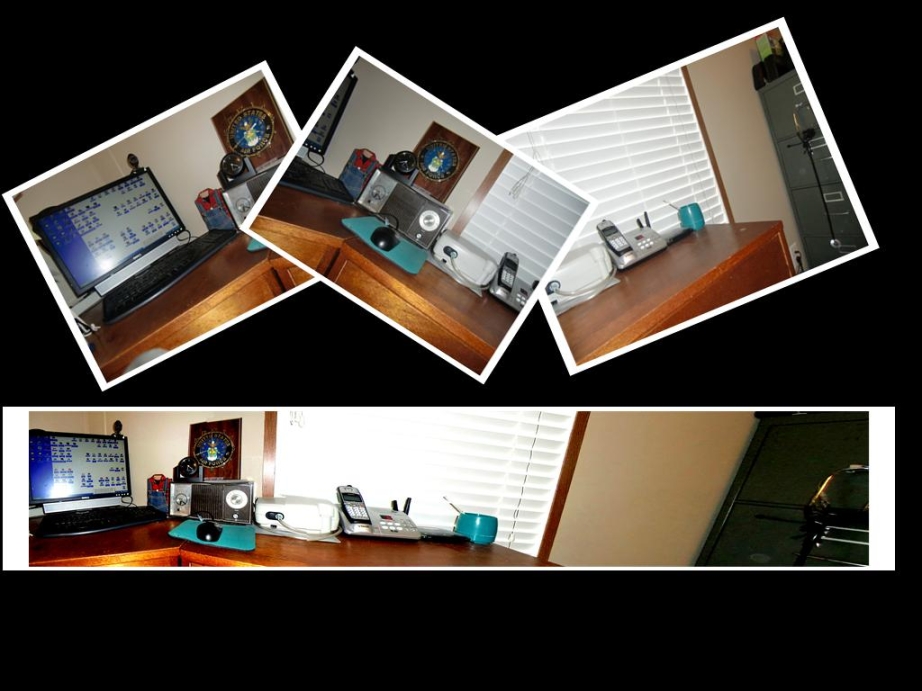
Image: "Panorama" from 3 overlapped frames - Gus Kilthau
1 person likes this
1 response

@topffer (42155)
• France
4 Jun 17
It is a good and easy technical guide. My camera has a panorama function, and there is a long time that I have not had to assemble a panorama. Working on Linux, I probably cannot use the Microsoft software, because Microsoft does a lot of efforts to prevent their software to work on a Linux computer. I had a look and found a very simple free plugin working on Gimp, pandora : you open all the pictures used in the panorama, and launch the plugin.
Have a nice day.

(and Tips for Making Panoramas in GIMP) Pandora is a GIMP script which helps in stitching together multiple images to make a panorama. It does not find image matches automatically, but it does automate the most tedious part of making a panorama: creating a
1 person likes this
@Ceerios (4698)
• Goodfellow, Texas
4 Jun 17
@topffer - Hi "Digger" - I also use Linux OS and have GIMP (and some of its friends) loaded on this computer. You are probably correct about "ICE" not functioning on Linux, and so I appreciate your helping all who use Linux OS produce panoramas - including me. -Gus-
1 person likes this
@topffer (42155)
• France
4 Jun 17
@Ceerios Nice, Gus, I did not knew that you were also using Linux Before installing a Windows software I always have a look at WineHQ. The last tested version of ICE is at Garbage rating, the previous one was at Silver. Microsoft is very good to make our life difficult, and their technique improves
 .
.
Before installing a Windows software I always have a look at WineHQ. The last tested version of ICE is at Garbage rating, the previous one was at Silver. Microsoft is very good to make our life difficult, and their technique improves.
Open Source Software for running Windows applications on other operating systems.
1 person likes this
