

Whats this "BIOS"memory of the PC ?

By ishavasyam
@ishavasyam (1801)
India

December 6, 2006 12:30am CST
During surfing,now a days my lap top gets this message" Check with ur hardware vendor for ne BIOS updates.Disable BIOS memory options such as CACHING or shadowing "...so want to know what is this and how to take care of this problem ?My continuity is lost because after this message the system shuts down and needs to be re started which takes 3 min....can u plz help ?
3 responses

@rikpallav (1242)
• India
6 Dec 06
I would like to inform you that BIOS is not a memoy but BIOS stands for Basic Input Output System. It is the system which stored all the information about you computer and the very basic hardware level information of the computer. So it hadles the caching memory and other things and from where you can control the setting of it. I would request you to et in touch with a local computer repair person to get out of the issue that you are facing.

@Daffs06 (300)
• Indonesia
6 Dec 06
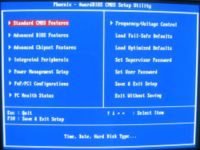
BIOS, in computing, stands for Basic Input/Output System also incorrectly known as Basic Integrated Operating System. BIOS refers to the software code run by a computer when first powered on. The primary function of the BIOS is to prepare the machine so other software programs stored on various media (such as hard drives, floppies, and CDs) can load, execute, and assume control of the computer. This process is known as booting up.
BIOS can also be said to be a coded program embedded on a chip that recognises and controls various devices that make up the computer. The term BIOS is specific to personal computer vendors. Among other classes of computers, the generic terms boot monitor, boot loader or boot ROM are commonly used.
The vast majority of PC motherboard suppliers license a BIOS "core", and toolkit from a commercial third party, which creates and maintains such a core. The motherboard manufacturer then customizes this BIOS to suit its own hardware - for this reason updated BIOSes are normally obtained directly from the motherboard manufacturer. so check new update of your BIOS configurating and Update your PC with this new BIOS and hope your problem will be solved. But be carefull! wrong installation will lost your BIOS data.
@ishavasyam (1801)
• India
6 Dec 06
Such is the wealth contained in ur answer that without waiting for further answers,I hereby declare this as the best answer.Thank U so much for enlightening...

@cooldude8889 (2609)
• Singapore
27 Dec 06
BIOS means basic input and output system.It ontrols the input and output like your hdd and cd drive and others.
