

how to make ur computer really fast

By hiyellowmoon
@hiyellowmoon (555)
India

January 15, 2007 8:11am CST
these are real fact..do it and see
1.clean or delete all files in c:/windows/temp
2.take run from start ..then
type prefetch
clean all those files too
3.run from start
type msconfig
then take the start up tab..
disable all messengers and other unused programs...like winap..etc dont disable system softwares and anti virus...programs..
restart after all these and ur computer will boot up faster....
regards..
2 responses

@kingadnan (1538)
• Pakistan
15 Jan 07
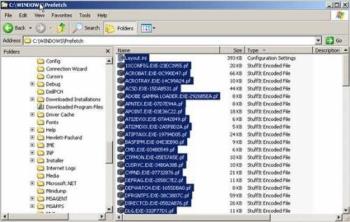
yes dude this is really very useful information i really ike it and i will implement to make my pc performancs better, wel do you know about prefetch, let me tell about prefetch, The prefetch folder is use to help speed up the loading of programs, you can clean this folder, or also you can also set its setting in registry . just type regedit, and go to HKEY_LOCAL_MACHINE\SYSTEM\CurrentControllSet\Controll\Session Manager\Memory Management\Prefetch Parameters.
Look for the key named EnablePrefetcher, just edit it and enter value:
0: Dissable
1: Application Launch Prefetch
2: Boot Prefetch
3: Prefetch Every thing
Thanks dude
@hiyellowmoon (555)
• India
15 Jan 07
thank u ...ya friends that is the best way...too..but remember ..be careful while dealing with registry..only experinced ppl do that..

