

Internet Explorer - how to uninstall?


By yspmyl
@yspmyl (3435)
Malaysia

December 12, 2010 4:49am CST
I recently have upgraded the Internet Explore 8 to Internet Explorer and later I found out that some of the website's program did not work on IE 9, so I wanted to remove it and reinstall with the earlier version of IE, but after looking in the control panel, I can't uninstall it in anyway at all.
Is any mylotter can help to tell me how to uninstall IE from my computer?
1 response

@elkanwa (626)
• Malaysia
12 Dec 10
Go to control panel - program - program and feature - and go to turn windows feature on or off at the right side. Uncheck internet explorer and wait for a while.
I don't know how to completely uninstall IE from windows. This is only removing internet explorer from windows feature, the application still existed, and You can reactivate again.
I remove both IE and windows games as well because I am not interesting to use it.
@yspmyl (3435)
• Malaysia
13 Dec 10
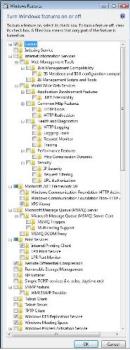
Hi, Thank you for responding to this discussion, I have done by follow what you have told me, but it seem that there are no Internet Explorer at all for selection. Do you have any more idea? Attached is the picture of the turn windows feature on or off that I am having. You can see that there is no any option at all to un-select the Internet Explorer. Any idea?
Thank you!

