

How to edit images for MyLot so they upload faster

By Ann LeFlore
@poehere (15123)
French Polynesia

November 5, 2015 2:05pm CST
Everyone loves to use their own images here on MyLot. However, some images are rather large and take a long time to upload. Furthermore, these images use a lot of storage space on the servers. Therefore it’s a great idea to edit the pixel size of your images.
Here is a simple, quick, and easy way to do just that. I use a free program called PhotoScape. Even if you don’t know anything about image editing this program is a breeze to use. Here is a quick guide to show you how simple it is to edit your images.
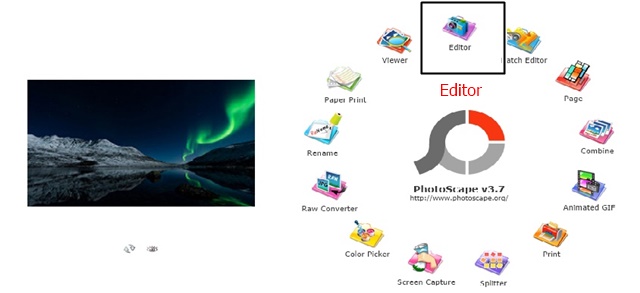
1. After opening the program select the edit function.
2. In the menu on the left you will see your directories or file folder. Find the file folder for your image. The images will be displayed in the box under your file folders.
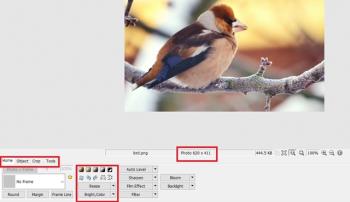
3. Your edit page will open up. Here you can crop an image or resize an image. For MyLot it’s best to use an image that has a photo size or pixel size of 640 x 450. The editor will resize the images if you only change the Width Pixel. Use your cursor and error keys to clear the box. Enter 640 in the box.
4. Now save your image. On the right you will see the save button. Click on this button and choose the option “Save As” – just give your image a new name.
This is a simple 4 step process to resize the pixel size of an image to upload to MyLot. The images upload faster and you save a lot of time.
Hope you enjoyed this guide and will consider editing some of your images next time you upload them to MyLot.
24 people like this
26 responses

@poehere (15123)
• French Polynesia
5 Nov 15
Yes you are right. But when I suggested this one time there were so many people who commented and said they would rather use their own images on the site. In order to do this they need to be edited if they are taken with a digital camera. Some digital cameras come with editing software but it is complicated and the basic person can't use them well. So this is just a simple way to do this to help people out.
2 people like this
@poehere (15123)
• French Polynesia
6 Nov 15
@hereandthere You can only download the smallest one for free. The other ones are paid and you need to buy them. That is why everyone download the smallest size for free.
1 person likes this
@poehere (15123)
• French Polynesia
6 Nov 15
@hereandthere Yes it is always on M because you pay for this one. Only the small ones are free. So normally people will always switch and select the smaller ones to use for free.

@BACONSTRIPSXXX (18159)
• Torrington, Connecticut
5 Nov 15
I just crop the image with my phone and edit and upload the post from my phone, takes less than 2 minutes
4 people like this


@hereandthere (45628)
• Philippines
6 Nov 15
@baconstripsxxx i didn't know i could edit the pictures after taking them with my phone until my friend showed me how because i'm not really a gadget person. 
2 people like this


@Gina145 (3949)
• Johannesburg, South Africa
5 Nov 15
There's another good reason to resize images before uploading them to any internet site. Some people think that any photo they find on the internet is free for them to use, so the smaller the photos, the less those people are able to do with them.
2 people like this

@kevin1877uk (36987)
•
5 Nov 15
Totally right some people will steal your photos if they are a much larger size. If they are much smaller they can't do much with them.
@kevin1877uk (36987)
•
5 Nov 15
@poehere You always get some people who will take and not ask.
1 person likes this

@Drosophila (16568)
• Ireland
5 Nov 15
@poehere Yep! I do try to upload a picture whereby it's applicable. :D The gianoumous size of pictures is what's preventing me from uploading more.
1 person likes this
@poehere (15123)
• French Polynesia
5 Nov 15
@Drosophila Try this program to make it simple to upload more images to your posts. I am sur you will find it very helpful to edit your images.
1 person likes this


@owlwings (43897)
• Cambridge, England
5 Nov 15
@poehere The maximum file size that MyLot can cope with is 3Mb. It accepts .JPG, .PNG .GIF and .BMP. The first two are compressed formats and the file size has only a hazy relationship with the actual pixel size of the image but a 3Mb .JPG would usually be absolutely massive in terms of pixel size!
I believe that different constraints apply to avatar images, especially animated .GIFs, which I believe must be square and no larger than 80x80, I think, but I don't have the full details to hand right now.
4 people like this
@poehere (15123)
• French Polynesia
5 Nov 15
@owlwings I think you are right on this one. I just find it easier to upload images here to re-size them and use this setting in this photo editor. It does shirk the image size and make it easier for the site to handle. I thought the avatar images were 100x100 but I could be wrong on this one. I think that is what I made mine when I put it up on the site.
When I wrote this up I was trying hard to be very simple, basic, and explain how to make an image the right size to upload here if they used their digital camera. I saw a lot of people had issues with images and didn't understand a lot about editing images. I asked Alex before I wrote this up and he gave me a  to do it. I just thought this would be a very easy basic way for people with not a lot of computer experience to edit their images for the site.
to do it. I just thought this would be a very easy basic way for people with not a lot of computer experience to edit their images for the site.1 person likes this
@poehere (15123)
• French Polynesia
5 Nov 15
Yes large camera images are hard to upload here to the site and take a long time to upload. Normally the site will time out and this is when an error comes. If you use this simple free program you'll won't have any more issues with it. I find it is fast and a lot less to do than a few of the photo editing software that comes with windows. You might like it once you try it. But basically what ever you use you should edit the size of the image to upload here to the site.
3 people like this

@poehere (15123)
• French Polynesia
5 Nov 15
Yes I can understand this one. A lot of my images are taken with my camera and they are very large to upload here. Some other people use their own images and it can take a bit of time to upload them too. I just thought it might be nice to see how to do this easily and save a lot of time uploading them.
2 people like this
@poehere (15123)
• French Polynesia
5 Nov 15
@pgntwo I didn't realize the site had an image limit when I first started. Once you told me the limit I knew what to do. I share this editor because it was simple, basic and I feel that anyone can do this using this program. There are a lot of editors on the market some paid and some free. This one I tested some years back for the school here on the islands. They just wanted a very simple editing program to teach the kids how to edit images. I chose this one and they loved it. It is so easy for them to teach children a few basic steps to editing images. Most of he schools here start the kids at the age of 6 learning some basic computer skills. This program is one of the ones they adopted here to do this with.
2 people like this

@Asylum (47893)
• Manchester, England
5 Nov 15
@poehere The best free image editing program that I know of is GIMP, which was originally designed as open source for Linux systems but is now available for Windows as well.
Despite being free this is a sophisticated and versatile image editor.
2 people like this
@poehere (15123)
• French Polynesia
5 Nov 15
Yes you can use windows paint if you wish and if you have an office package you can use the photo editor on this one too. I just thought this was a nice program because it is a basic photo editor and if people don't understand how to use one this is simple for them to use.
1 person likes this
@poehere (15123)
• French Polynesia
5 Nov 15
@Asylum Yes I know this one. I use it too. I basically found a very simple, easy editor that any person could use to re-size their images for this site. I know some people here don't have a lot of computer skills so this program is so basic they can use it to edit their images.
1 person likes this
@owlwings (43897)
• Cambridge, England
5 Nov 15
I just took a look at PhotoScape. It's a neat little program and pretty easy to get the hang of. I mostly use IrfanView, which is also a good program to use for resizing and other simple photoediting. PhotoScape has the edge, however, for some effects and especially for making collages and one or two other things I shall find useful. Thanks for mentioning it! 
1 person likes this
@poehere (15123)
• French Polynesia
6 Nov 15
@owlwings Thank you so much. I did not think of this and maybe I should add it also to my original post. I did not want to over tag the post and just selected ones that best fit the topic. I was thinking of add tutorial but then I changed my mind on this one. But faqs is a good idea for a tag and maybe also tutorial too.
1 person likes this
@poehere (15123)
• French Polynesia
5 Nov 15
You are welcome. I wasn't sure I could so I checked first before posting this. Alex liked the idea so I wrote it up. I find it a nice simple, basic program that is so easy to use to do different editing function with.
One teacher at the school asked me to find a very basic photo editing program that was free and easy to use. She needed to teach her class of 5 years old kids how to edit some images. I tested a lot of them and I chose this one because it was the simplest one for children to learn from.
I know everyone has their program that they use to edit images. For a basic computer beginner they are not as easy for them to understand. I found this one as simple as can be and so easy to understand. Hope you have fun using it.
2 people like this
@kevin1877uk (36987)
•
5 Nov 15
With being a photographer I use Lightroom and Photoshop to edit my work.I do resize them down never uploading a full size photo.
1 person likes this
@kevin1877uk (36987)
•
5 Nov 15
@poehere Yeah thank yo for writing it, I hope some people take it on board. it not the best idea to upload big size files/photos online. The only time you do that if you are selling you work as a download or uploading photos to Zazzle to make product out of or the likes of Shutterstock.
2 people like this
@poehere (15123)
• French Polynesia
5 Nov 15
This is perfect for you because you understand how these programs work. There are a few people here who have no idea how to do this at all. I sort of wrote this up for them so they could use this technique to resize their images and upload them here.
1 person likes this
@Gina145 (3949)
• Johannesburg, South Africa
5 Nov 15
@kevin1877uk I said something similar before reading the comments. I also use Photoshop but when I used a trial version of Lightroom I didn't like it.
1 person likes this

@AbbyGreenhill (45490)
• United States
5 Nov 15
I've been write online using photos since 08 and I learned early on to set my camera to the smallest size and it works out fine I have no problem uploading them and I don't have to fuss with them.
1 person likes this
@AbbyGreenhill (45490)
• United States
5 Nov 15
@poehere People send full size to me e-mail and it takes forever to download - I send mine w/o a problem.
@poehere (15123)
• French Polynesia
5 Nov 15
@AbbyGreenhill For emails I have this simple free photo shrink program that runs in the background. So I can send full size images and it shrinks them so they pass through emails so quickly. I sort of got in the habit of using this one a long time back and it is nice because you only set it up once and what you want to use it for and just leave it.
1 person likes this

@cahaya1983 (11116)
• Malaysia
6 Nov 15
Seems like a good photo editing program. I usually just use the Microsoft Picture Manager for basic photo editing. I'm sure many people would find this helpful.
1 person likes this

@poehere (15123)
• French Polynesia
6 Nov 15
I am so glad this helped you out. I find it simple and useful this program to edit images on the fly. Not a lot to do there and it is quick and easy.

@JamesHxstatic (29410)
• Eugene, Oregon
5 Nov 15
Good explanation! I was wondering what the optimal size for images is here.
1 person likes this

@Pattitude (1286)
• Newton, North Carolina
5 Nov 15
I have not even tried putting an image in yet. Great tips!
2 people like this
@poehere (15123)
• French Polynesia
5 Nov 15
@vickyrose That is a good way to do this. A lot of people here don't understand this. Maybe you can help them out with a how to tutorial so they can learn a little more. I did this one because the program is basic and easy for them to use and understand.
1 person likes this

@vickyrose (2236)
• Cooma, Australia
5 Nov 15
I just reduce the size of my photos using Windows - to 'web image' and it downloads fast.

@marguicha (230365)
• Chile
9 Nov 15
This is exactly what I need. Where do it get this free program?
@poehere (15123)
• French Polynesia
9 Nov 15
I hope it is ok to post the link here I might get in trouble for this one. But anyhow here is where you can find it

:: PhotoScape X (Mac) VideoBlend (Mac) PicTriev EditPlus Bandicam Today English Português Español ??????? Japanese Chinese Korean PhotoScape PhotoScape is a fun and easy photo editing software that enables you to fix and enhance photos. Ke

@allknowing (153529)
• India
6 Nov 15
i use 'paint' which has all the edit features - simple to use.
@allknowing (153529)
• India
6 Nov 15
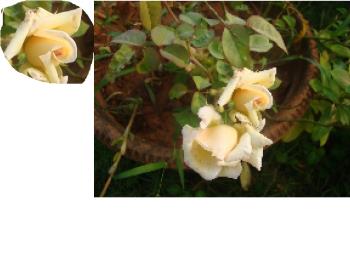
@poehere I have no issues with paint. I find it very simple. It can even crop in irregular shapes
.
@poehere (15123)
• French Polynesia
6 Nov 15
@allknowing Yes I understand this one and I use it. The program is great for screen shots and doing stuff with them. The point here was that some people are not so good with computers. I found this small program nice and very simple and even the basic computer user can use it to edit an image. It is very simple to use. Each person has their own editing software to use that they like. Some people don't know what to use that won't take a long time to learn. That is just why I suggest this one to try and they might like it.
1 person likes this
@poehere (15123)
• French Polynesia
6 Nov 15
Here a few people have some issues with paint and they asked me for a simpler to use program. I found this one and they loved it so I decided to introduce it here for people who don't understand how to use other editors. This one is simple and super easy to learn and use.

@thesids (22180)
• Bhubaneswar, India
6 Nov 15
I find it easier to work with the Paint application that comes with Windows. But then, this application you mention - "PhotoScape" seems to be all good too.
In case you have Microsoft office installed, The Picture Manager as some good features too to crop resize and even decrease the quality of the pictures that you might want to use here - all of these help in decreasing the file size.
In any case, remember to keeping the aspect ratio intact.
@poehere (15123)
• French Polynesia
6 Nov 15
You are correct on this one. There is a lot of good photo editing program such as GIMP too. I'm not sure if people know how to use Microsoft picture manager. I guess the reason I chose this one to write about it how simple and easy it is to use and you don't need to load in images and the menus are at the bottom to make it easy to use. I think what ever works for people they should use what they feel comfortable with using. For people who don't know a lot about computers and have never used an editor before this one is a good choice for them to try.

@Tampa_girl7 (54730)
• United States
5 Nov 15
I am horrid at trying to do these things. Thanks for explaining.
1 person likes this
@poehere (15123)
• French Polynesia
5 Nov 15
You are welcome. This is such a simple easy way to edit images. I think you might like this. The program is very basic and makes it super easy for anyone with limited computer skills to edit an image. Yes I know that windows has a paint program that can do this and I use it from time to time. But what I liked about this simple program is the easy to use features. I suggested it here because a lot of my clients and the school love this program to edit images.
1 person likes this

@poehere (15123)
• French Polynesia
6 Nov 15
@JustEmm I guess I have a lot of experience in this one. I have written books for people to understand different tools that are very difficult to use. I also have written some guides to help people understand how to use their computer or run a certain program. I think it's important to explain how to do this in easy steps that anyone can understand and follow. I noticed a long time ago user manuals are not set up to help people because a lot of the way they explain things is not so easy to understand. I think being simple is better for everyone.
1 person likes this

@fishtiger58 (29819)
• Momence, Illinois
9 Dec 15
I have Picasa but I might have to give this a try. I know a lot of people us Photoscape.
@poehere (15123)
• French Polynesia
9 Dec 15
It is so simple and easy to use. I like it for fast editing and down sizing images. It is quick and does an excellent job. I have a lot of different photo editors bhut I do like this one the best for downsizing images.
