

Stretching Your Little Camera

By Gus Kilthau
@Ceerios (4698)
Goodfellow, Texas

December 2, 2016 12:31pm CST
Stretching Your Little Camera -
Some time back, I bought a used camera that seemed to work pretty good. Around that same time I read something about "panorama" images - those wide, wide pictures of scenes that stretched all the way across the purple mountains, the fruited plains, or the entire front of the great wall of China. It was said that you could make those monster-size pictures using whatever kind of little camera you had in hand. All you needed was your camera and a computer program in your personal computer, and away you could go.
Sounded like fun to me.
I found a free demonstration panorama-production computer program on the Serif-UK web site, downloaded the program, read the instructions as best I could and then out the door I went with that little camera in hand. That day was to be the birth day of my very first panorama image.
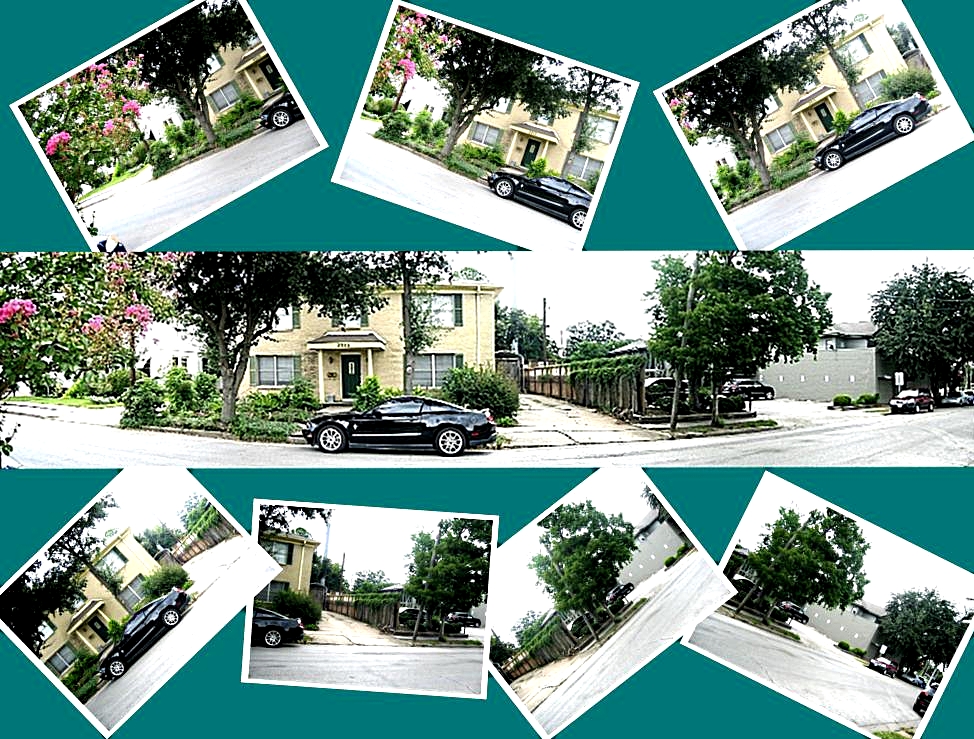
From across the street, I turned around and, like the panorama program directions had instructed, I pointed the camera toward the building next to our building and began to snap photos. I made seven of those photos, each of which was overlapped a bit - like maybe 20% or so. The seventh of the pictures was of the view from where I stood to way down to the end of the street. Guessing now, the distance from the first photo to the seventh photo was probably about 400 feet - like the whole inside of a football stadium. Plenty wide. Too wide for my camera lens to even think of covering that view in a single shot.
Into the computer went the seven images. Through the stitcher program and onto the computer's disk went the panorama. The seven individual, overlapped images had been stitched together. You could not tell where the stitching took place, either. Not bad for a first try.
Those old images floated to the top yesterday as I was playing around with some old image files. It seemed like keeping a good picture of that old Panorama Number One was a fine idea. So I put the individual seven images together with the wide panorama into a single collage image that showed them all together. It is up on top for you to see. (The collage was made using another free computer program, "Collage Plus," which I downloaded from SourceForge.net.)
If I can do it like that, then you can, too.
* * * * * * * * * *
Image - Number1 Panorama and Friends - Gus Kilthau
* * * * * * * * * *
2 people like this
2 responses

@topffer (42155)
• France
2 Dec 16
It looks perfect, congratulations I have not done panoramas since years. My first ones were far to be perfect, I remember I had different shades of colors from a picture to another
 .
I have a "Panorama" position on the last camera I bought. I do not know how it is supposed to work, I have to read the manual and try it.
.
I have a "Panorama" position on the last camera I bought. I do not know how it is supposed to work, I have to read the manual and try it.
I have not done panoramas since years. My first ones were far to be perfect, I remember I had different shades of colors from a picture to another.
I have a "Panorama" position on the last camera I bought. I do not know how it is supposed to work, I have to read the manual and try it.1 person likes this
@Ceerios (4698)
• Goodfellow, Texas
2 Dec 16
@topffer - Hi "Digger" - Thank you for the kind comment about the pano pic. I have a panorama setting on this camera, too, but I have never used it. I shoot each photo frame by itself and then put the shots through the pano program to do the stitching. Maybe, like you intend to do, I might give the camera thing a try sometime soon.  -Gus-
-Gus-
-Gus-1 person likes this
 . I just had a look : on my Olympus, it is supposed to create automatically the panorama by moving slowly the camera.
@Ceerios (4698)
• Goodfellow, Texas
2 Dec 16
@topffer - Good Friend "Digger" - That may be how my camera is supposed to do the pano thing, too. I will try it, but I am habituated to make the individual images by moving the camera one shot at a time. We shall see what we shall see... -Gus-
1 person likes this


