

which monitor has better clarity a 14" or a 21"

By knightrider
@knightrider (1083)
India

August 6, 2008 11:49pm CST
i fell the smalelr monitors have better clarity, cos now i use a 17" monitpr whic is not as clear as my earlier 14"but has more space now i am plannign to buy a 21" monitor i hope it has more clarity and space
5 responses

@greenline (14838)
• Canada
7 Aug 08
The quality of monitors are getting better. I am using a 17" monitor too. Clarity is quite good and the view is much better than using a 14".


@Muelitz (1592)
• Canada
7 Aug 08
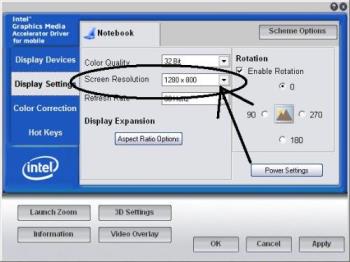
You adjust the resolution to make the display clearer. No matter how big the screen size of the monitor or LCD you buy, it will not give a clear image if you do not set the screen resolution. See attached image. The higher the resolution value the better the picture quality. Below is a list of available resolutions. Caveat: your display/video card must be able to support the resolution before you can set it. I hope this helps. Monitor Resolution
QVGA (quarter-video graphics array) 320 x 240
VGA (video graphics array) 640 x 480
WVGA (wide video graphics array) 800 x 480
SVGA (super video graphics array) 800 x 600
XGA (extended graphics array) 1024 x 768
WXGA (wide extended graphics array) 1280 x 800
WXGA+ 1440 x 900
SXGA (super extended graphics array) 1280 x 1024
SXGA+ 1400 x 1050
UXGA (ultra extended graphics array) 1600 x 1200
WSXGA+ (wide super extended graphics array) 1680 x 1050
WUXGA (wide ultra extended graphics array) 1920 x 1200
WQXGA (wide quad extended graphics array) 2560 x 1600
Monitor Resolution
QVGA (quarter-video graphics array) 320 x 240
VGA (video graphics array) 640 x 480
WVGA (wide video graphics array) 800 x 480
SVGA (super video graphics array) 800 x 600
XGA (extended graphics array) 1024 x 768
WXGA (wide extended graphics array) 1280 x 800
WXGA+ 1440 x 900
SXGA (super extended graphics array) 1280 x 1024
SXGA+ 1400 x 1050
UXGA (ultra extended graphics array) 1600 x 1200
WSXGA+ (wide super extended graphics array) 1680 x 1050
WUXGA (wide ultra extended graphics array) 1920 x 1200
WQXGA (wide quad extended graphics array) 2560 x 1600

Monitor Resolution
QVGA (quarter-video graphics array) 320 x 240
VGA (video graphics array) 640 x 480
WVGA (wide video graphics array) 800 x 480
SVGA (super video graphics array) 800 x 600
XGA (extended graphics array) 1024 x 768
WXGA (wide extended graphics array) 1280 x 800
WXGA+ 1440 x 900
SXGA (super extended graphics array) 1280 x 1024
SXGA+ 1400 x 1050
UXGA (ultra extended graphics array) 1600 x 1200
WSXGA+ (wide super extended graphics array) 1680 x 1050
WUXGA (wide ultra extended graphics array) 1920 x 1200
WQXGA (wide quad extended graphics array) 2560 x 1600
