

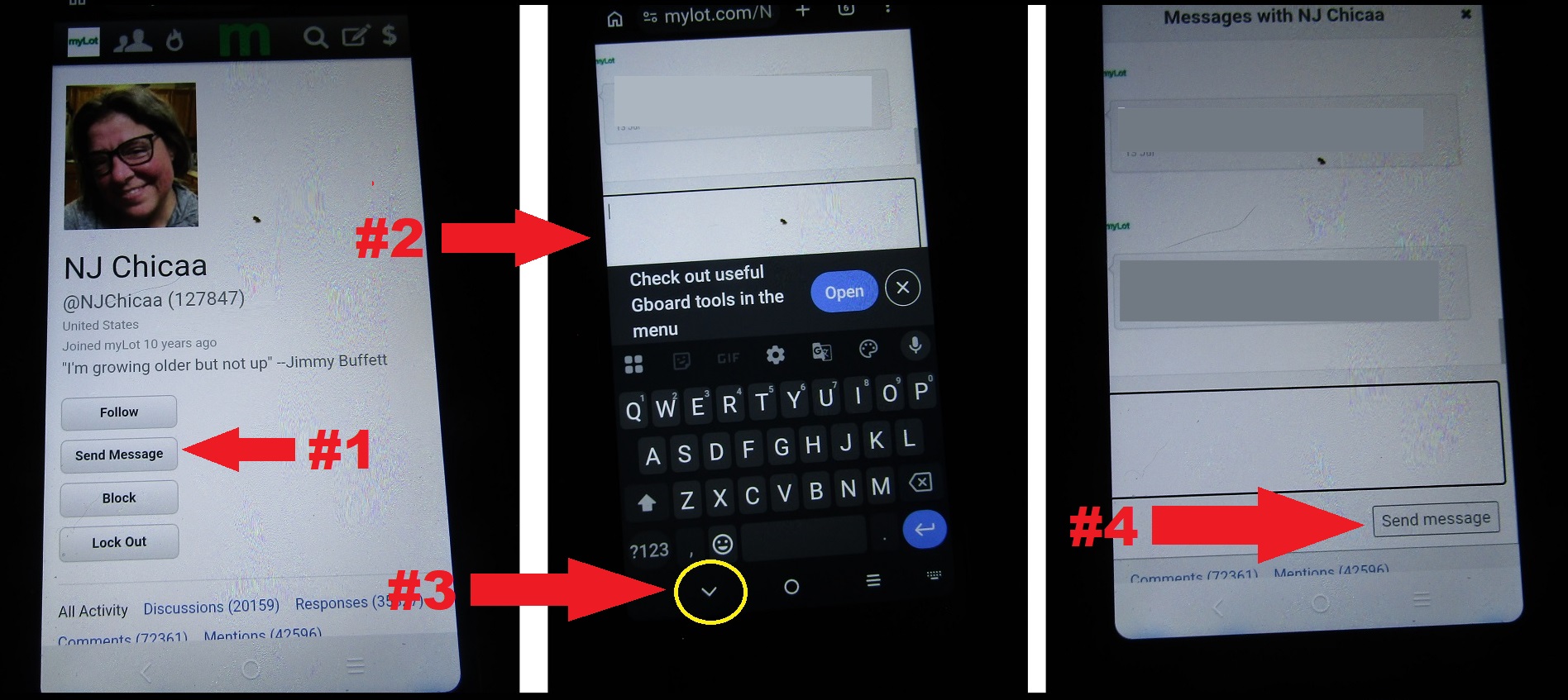
Send a myLot message in four easy steps!

@GoAskAlice (5865)

September 6, 2026 10:43am CST
First, visit the profile of the member you wish to send a message to and click the 'Send Message' icon.
Second, type your message in the box provided.
Third, move the keyboard out of the way if needed.
Fourth, click the 'send message' icon.
Simple and easy. 
15 people like this
9 responses


@Orson_Kart (8985)
• United Kingdom
7 Sep
I think it more a suggestion to message @NJChicaa rather than a tutorial, otherwise why have her profile displayed?
1 person likes this
@LadyDuck (505211)
• Italy
7 Sep
@Orson_Kart This is a question I asked to myself. Why to show her profile? He could have used Admin profile, or the profile of a myLotter who is no more here.
@GoAskAlice (5865)
•
7 Sep
I used the profile of the myLotter that stated in a discussion that she could not figure out how to send messages. Why is this appearing to be a problem?
1 person likes this


@Orson_Kart (8985)
• United Kingdom
7 Sep
“A walk in the park”
A trip in the dark
1 person likes this

 ..never heard of a trip in the dark..is that something you made up
@Orson_Kart (8985)
• United Kingdom
7 Sep
As you have used @NJChicaa as your example, I might just message her. If it’s not a suggestion to do so then she might give me short shrift, and then I’ll look a right fool (not for the 1st time, nor the last). 


@RasmaSandra (101948)
• Daytona Beach, Florida
6 Sep
Thanks for sharing, but I have no mobile phone. I do all my work on my desktop PC.
1 person likes this